> ## Documentation Index
> Fetch the complete documentation index at: https://docs-dev-feat-acl-curated-blocklist.mintlify.site/llms.txt
> Use this file to discover all available pages before exploring further.

> Learn how to configure an update policy form using Forms for Actions for users to review and accept new terms of service or consent updates.

# Use Cases: Configure an update policy form using Forms

<Card title="Before you start">
  1. Create a [Machine-to-Machine Application](/docs/get-started/auth0-overview/create-applications/machine-to-machine-apps) with the following scopes enabled:

  * `read:users`
  * `update:users`
  * `create:users`
  * `read:users_app_metadata`
  * `update:users_app_metadata`
  * `create:users_app_metadata`

  2. Add a [Vault connection](/docs/customize/forms/vault) using the M2M application credentials.
</Card>

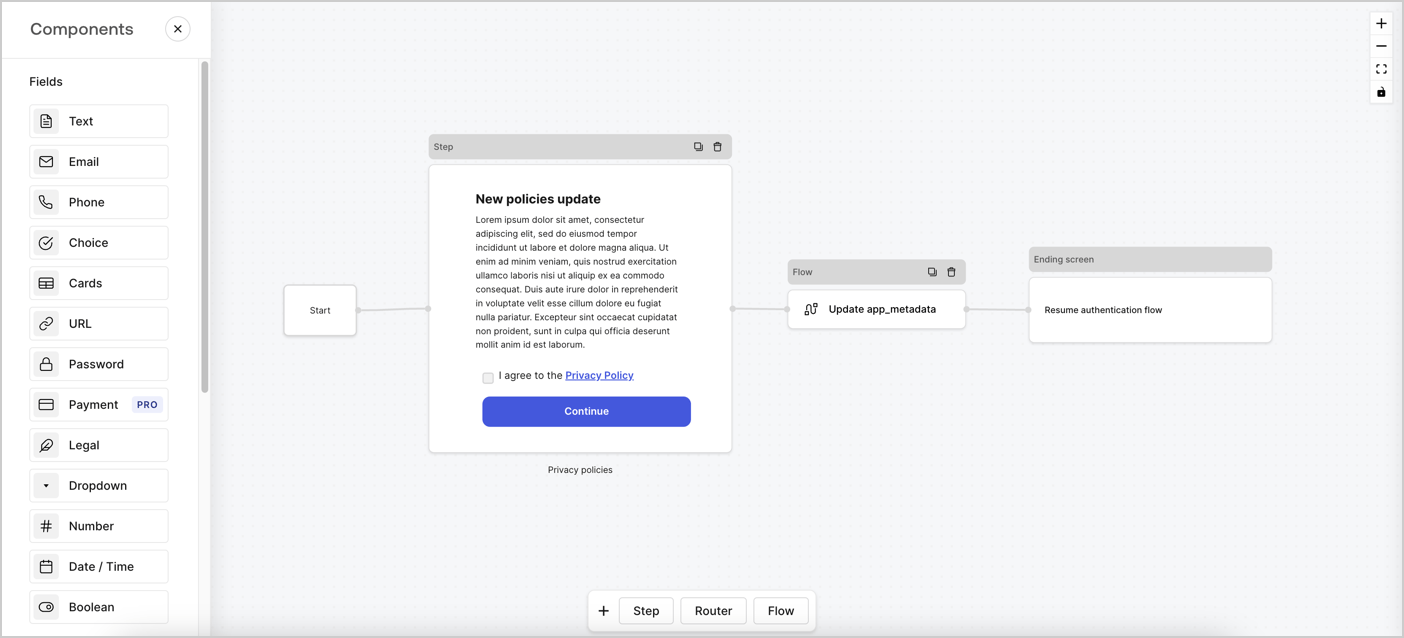
Forms for Actions allows you to create custom privacy policies flows and store the consent under the `app_metadata` object.
<Frame>
  <img src="https://mintcdn.com/docs-dev-feat-acl-curated-blocklist/IjeDUK9o6taASj-R/docs/images/cdy7uua7fh8z/6i68dMvHDTijfRmSgN1x8Q/ad900e7d4c0fb34645921435472b8684/privavy-policy-form.png?fit=max&auto=format&n=IjeDUK9o6taASj-R&q=85&s=568a328cfb4c57838ccf782a00e4140c" alt="Dashboard > Actions > Forms > Privacy policy use case" data-og-width="1404" width="1404" data-og-height="638" height="638" data-path="docs/images/cdy7uua7fh8z/6i68dMvHDTijfRmSgN1x8Q/ad900e7d4c0fb34645921435472b8684/privavy-policy-form.png" data-optimize="true" data-opv="3" srcset="https://mintcdn.com/docs-dev-feat-acl-curated-blocklist/IjeDUK9o6taASj-R/docs/images/cdy7uua7fh8z/6i68dMvHDTijfRmSgN1x8Q/ad900e7d4c0fb34645921435472b8684/privavy-policy-form.png?w=280&fit=max&auto=format&n=IjeDUK9o6taASj-R&q=85&s=0c847ba80d4df99cdeb64720320993a1 280w, https://mintcdn.com/docs-dev-feat-acl-curated-blocklist/IjeDUK9o6taASj-R/docs/images/cdy7uua7fh8z/6i68dMvHDTijfRmSgN1x8Q/ad900e7d4c0fb34645921435472b8684/privavy-policy-form.png?w=560&fit=max&auto=format&n=IjeDUK9o6taASj-R&q=85&s=a1cd4c3f2458ada40d0150f8b7dea644 560w, https://mintcdn.com/docs-dev-feat-acl-curated-blocklist/IjeDUK9o6taASj-R/docs/images/cdy7uua7fh8z/6i68dMvHDTijfRmSgN1x8Q/ad900e7d4c0fb34645921435472b8684/privavy-policy-form.png?w=840&fit=max&auto=format&n=IjeDUK9o6taASj-R&q=85&s=996827b2de34d9f091e756fbf78f2931 840w, https://mintcdn.com/docs-dev-feat-acl-curated-blocklist/IjeDUK9o6taASj-R/docs/images/cdy7uua7fh8z/6i68dMvHDTijfRmSgN1x8Q/ad900e7d4c0fb34645921435472b8684/privavy-policy-form.png?w=1100&fit=max&auto=format&n=IjeDUK9o6taASj-R&q=85&s=93481dc41ff67d9577492671a53f0630 1100w, https://mintcdn.com/docs-dev-feat-acl-curated-blocklist/IjeDUK9o6taASj-R/docs/images/cdy7uua7fh8z/6i68dMvHDTijfRmSgN1x8Q/ad900e7d4c0fb34645921435472b8684/privavy-policy-form.png?w=1650&fit=max&auto=format&n=IjeDUK9o6taASj-R&q=85&s=7c06ff99fc7a3723fc962ddd7d358997 1650w, https://mintcdn.com/docs-dev-feat-acl-curated-blocklist/IjeDUK9o6taASj-R/docs/images/cdy7uua7fh8z/6i68dMvHDTijfRmSgN1x8Q/ad900e7d4c0fb34645921435472b8684/privavy-policy-form.png?w=2500&fit=max&auto=format&n=IjeDUK9o6taASj-R&q=85&s=52beed460eef683d7b947f13c7f803eb 2500w" />
</Frame>

The sections below outline how you can create an Update Policy form using nodes and flows, along with steps for adding your form to a [Post Login](/docs/customize/actions/explore-triggers/signup-and-login-triggers/login-trigger) Action.

## Create a form from scratch

Follow these steps to create a form to gather information:

1. Open the Form editor by selecting **Auth0 Dashboard > Actions > Forms.**
2. Select **Create Form** > **Start from scratch**.

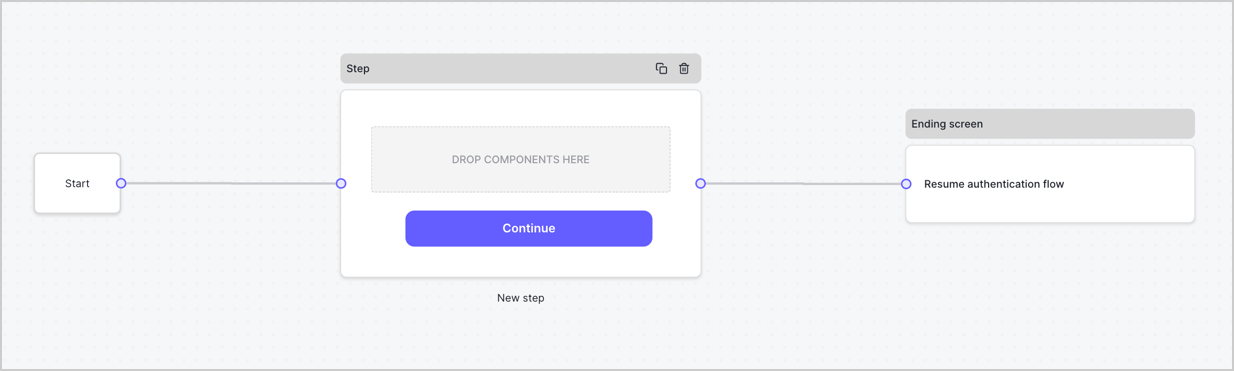
By default, a new form contains a Start node, a Step node, and an Ending screen node.
<Frame>
  <img src="https://mintcdn.com/docs-dev-feat-acl-curated-blocklist/-uRAUA7XzQSHJeRB/docs/images/cdy7uua7fh8z/2TZ9jSjgEcARFpULI6hz4R/a4319a1bd482f2ee5cc23100fdb2f42c/New-form-Forms-for-action-use-case.png?fit=max&auto=format&n=-uRAUA7XzQSHJeRB&q=85&s=511f6a27d824a1389beba3fbf5e77901" alt="Dashboard > Forms > Use Cases > Form" data-og-width="1234" width="1234" data-og-height="371" height="371" data-path="docs/images/cdy7uua7fh8z/2TZ9jSjgEcARFpULI6hz4R/a4319a1bd482f2ee5cc23100fdb2f42c/New-form-Forms-for-action-use-case.png" data-optimize="true" data-opv="3" srcset="https://mintcdn.com/docs-dev-feat-acl-curated-blocklist/-uRAUA7XzQSHJeRB/docs/images/cdy7uua7fh8z/2TZ9jSjgEcARFpULI6hz4R/a4319a1bd482f2ee5cc23100fdb2f42c/New-form-Forms-for-action-use-case.png?w=280&fit=max&auto=format&n=-uRAUA7XzQSHJeRB&q=85&s=4626278f5feea2e8834767a66e505c9c 280w, https://mintcdn.com/docs-dev-feat-acl-curated-blocklist/-uRAUA7XzQSHJeRB/docs/images/cdy7uua7fh8z/2TZ9jSjgEcARFpULI6hz4R/a4319a1bd482f2ee5cc23100fdb2f42c/New-form-Forms-for-action-use-case.png?w=560&fit=max&auto=format&n=-uRAUA7XzQSHJeRB&q=85&s=aacaae51dd5525e5a82e1cd8cfa1a492 560w, https://mintcdn.com/docs-dev-feat-acl-curated-blocklist/-uRAUA7XzQSHJeRB/docs/images/cdy7uua7fh8z/2TZ9jSjgEcARFpULI6hz4R/a4319a1bd482f2ee5cc23100fdb2f42c/New-form-Forms-for-action-use-case.png?w=840&fit=max&auto=format&n=-uRAUA7XzQSHJeRB&q=85&s=26889220bfd6d6ca56ae64680f15998f 840w, https://mintcdn.com/docs-dev-feat-acl-curated-blocklist/-uRAUA7XzQSHJeRB/docs/images/cdy7uua7fh8z/2TZ9jSjgEcARFpULI6hz4R/a4319a1bd482f2ee5cc23100fdb2f42c/New-form-Forms-for-action-use-case.png?w=1100&fit=max&auto=format&n=-uRAUA7XzQSHJeRB&q=85&s=478fd5c39ed088ef070ad5160b453bf7 1100w, https://mintcdn.com/docs-dev-feat-acl-curated-blocklist/-uRAUA7XzQSHJeRB/docs/images/cdy7uua7fh8z/2TZ9jSjgEcARFpULI6hz4R/a4319a1bd482f2ee5cc23100fdb2f42c/New-form-Forms-for-action-use-case.png?w=1650&fit=max&auto=format&n=-uRAUA7XzQSHJeRB&q=85&s=fb2771757537a76992ae5d849eaf2e9e 1650w, https://mintcdn.com/docs-dev-feat-acl-curated-blocklist/-uRAUA7XzQSHJeRB/docs/images/cdy7uua7fh8z/2TZ9jSjgEcARFpULI6hz4R/a4319a1bd482f2ee5cc23100fdb2f42c/New-form-Forms-for-action-use-case.png?w=2500&fit=max&auto=format&n=-uRAUA7XzQSHJeRB&q=85&s=26da2dad94211455388bc352b6b8a343 2500w" />
</Frame>

### Configure the Step node

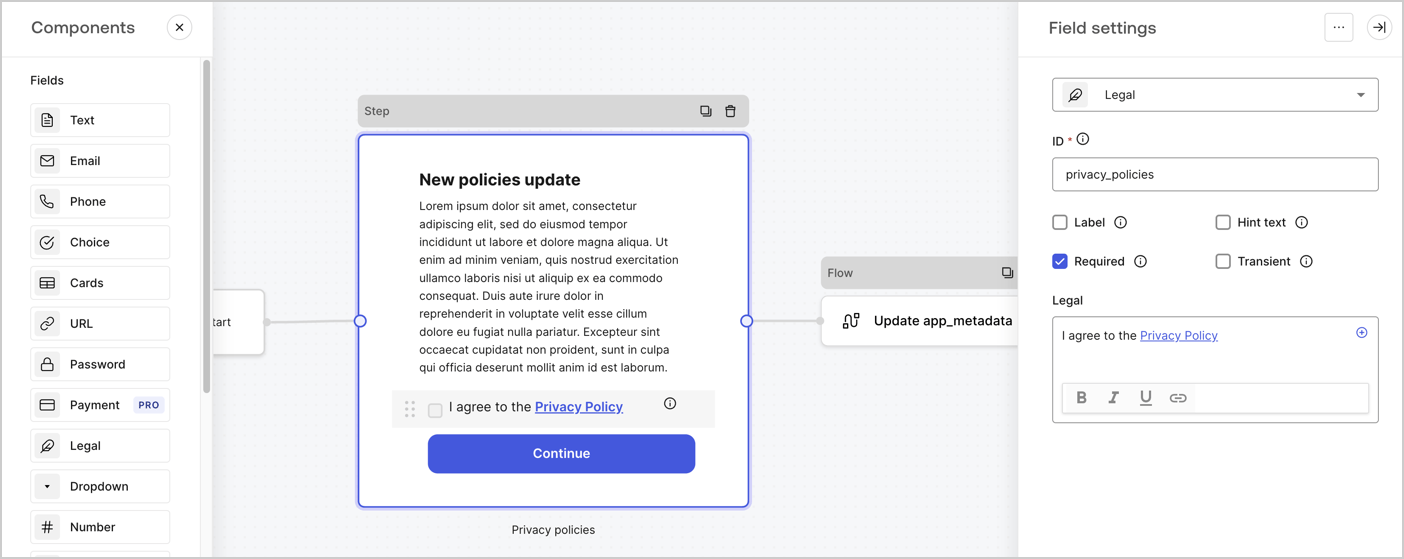
The Step node is the graphical interface visible to users. Add [Fields](/docs/customize/forms/nodes-and-components) to the Step node to collect the new agreement acceptance value by following these steps:

1. Drag a **Rich text** field from the **Components menu** into the **Step** node.

   * **Rich text**: Enter a description of your privacy policies updates.
   * Select **Save**.
2. Drag a **Legal** field into the **Step** node.

   * **ID**: Enter `privacy_policies`.
   * **Required**: Enable the checkbox.
   * **Legal**: Enter `I agree to the Privacy Policy`.
   * Select **Save**.
3. Select **Publish** to save.
<Frame>
  <img src="https://mintcdn.com/docs-dev-feat-acl-curated-blocklist/BMQqsLetwNhvabw_/docs/images/cdy7uua7fh8z/59zFFjQjAnjogkc2QGIqqJ/0ad66b1b636544122aa4e65968b76c2c/privacy-policy-step-node.png?fit=max&auto=format&n=BMQqsLetwNhvabw_&q=85&s=df85c8fd208ee31ef8fa089a65b11354" alt="Dashboard > Actions > Forms > Use case privacy policy step node" data-og-width="1404" width="1404" data-og-height="559" height="559" data-path="docs/images/cdy7uua7fh8z/59zFFjQjAnjogkc2QGIqqJ/0ad66b1b636544122aa4e65968b76c2c/privacy-policy-step-node.png" data-optimize="true" data-opv="3" srcset="https://mintcdn.com/docs-dev-feat-acl-curated-blocklist/BMQqsLetwNhvabw_/docs/images/cdy7uua7fh8z/59zFFjQjAnjogkc2QGIqqJ/0ad66b1b636544122aa4e65968b76c2c/privacy-policy-step-node.png?w=280&fit=max&auto=format&n=BMQqsLetwNhvabw_&q=85&s=12d5aa3429749c3144de0d43dd88b73d 280w, https://mintcdn.com/docs-dev-feat-acl-curated-blocklist/BMQqsLetwNhvabw_/docs/images/cdy7uua7fh8z/59zFFjQjAnjogkc2QGIqqJ/0ad66b1b636544122aa4e65968b76c2c/privacy-policy-step-node.png?w=560&fit=max&auto=format&n=BMQqsLetwNhvabw_&q=85&s=155fc1a968f86413af1f3638dd1a3fba 560w, https://mintcdn.com/docs-dev-feat-acl-curated-blocklist/BMQqsLetwNhvabw_/docs/images/cdy7uua7fh8z/59zFFjQjAnjogkc2QGIqqJ/0ad66b1b636544122aa4e65968b76c2c/privacy-policy-step-node.png?w=840&fit=max&auto=format&n=BMQqsLetwNhvabw_&q=85&s=8a05f911aea8f29480c31f01221ddb5c 840w, https://mintcdn.com/docs-dev-feat-acl-curated-blocklist/BMQqsLetwNhvabw_/docs/images/cdy7uua7fh8z/59zFFjQjAnjogkc2QGIqqJ/0ad66b1b636544122aa4e65968b76c2c/privacy-policy-step-node.png?w=1100&fit=max&auto=format&n=BMQqsLetwNhvabw_&q=85&s=b3a0c49f0651fc4278d42a0adff58fa5 1100w, https://mintcdn.com/docs-dev-feat-acl-curated-blocklist/BMQqsLetwNhvabw_/docs/images/cdy7uua7fh8z/59zFFjQjAnjogkc2QGIqqJ/0ad66b1b636544122aa4e65968b76c2c/privacy-policy-step-node.png?w=1650&fit=max&auto=format&n=BMQqsLetwNhvabw_&q=85&s=2db692b7168eb344f16b49440d4a119f 1650w, https://mintcdn.com/docs-dev-feat-acl-curated-blocklist/BMQqsLetwNhvabw_/docs/images/cdy7uua7fh8z/59zFFjQjAnjogkc2QGIqqJ/0ad66b1b636544122aa4e65968b76c2c/privacy-policy-step-node.png?w=2500&fit=max&auto=format&n=BMQqsLetwNhvabw_&q=85&s=4348dfa959755edbcb3bf632bab28ec4 2500w" />
</Frame>

### Configure the Flow node

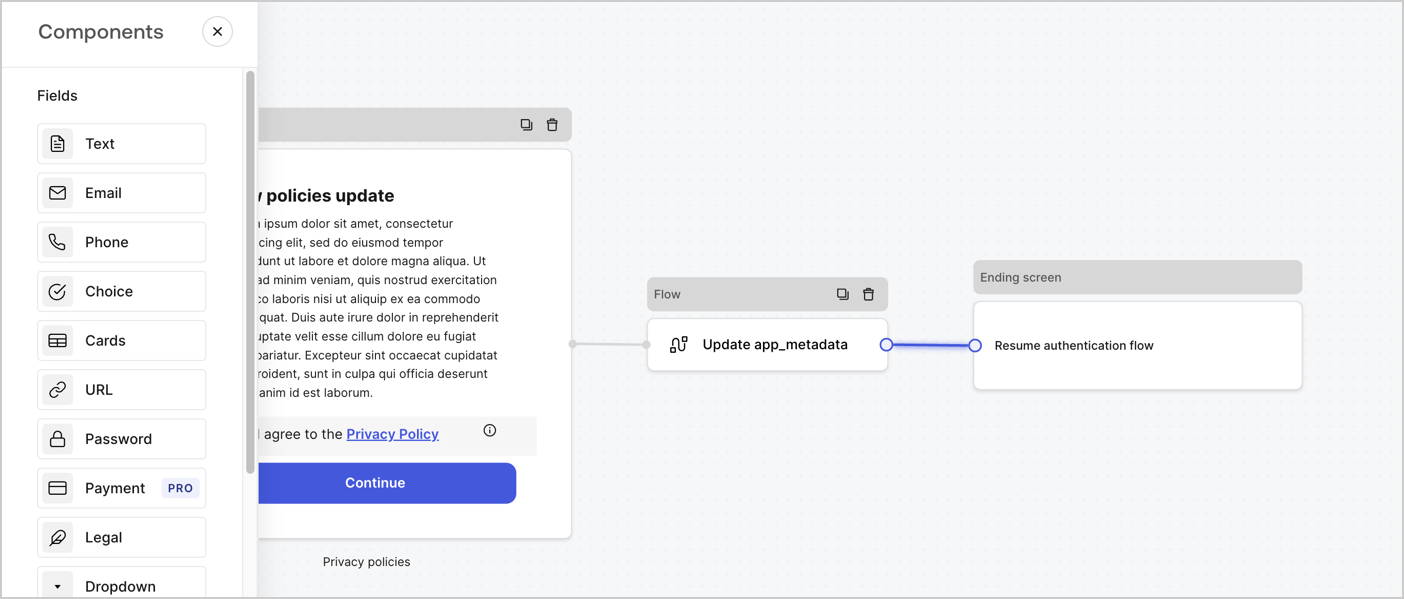
Add a **Flow** node after the **Step** node to update the `app_metadata` and resume the authentication flow by following these steps:

1. Select **Flow** from the bottom of the Form editor.
2. Remove the existing link between the **Step** and **Ending Screen** nodes.
3. Select the new **Flow** > **Click to add a flow** > **Create a new flow.**

   * Enter `Update app_metadata` in the **Name** field.
   * Select **Create**.
   * Select **Save**.
4. Link the **Flow** node to the **Step** and **Ending Screen** nodes as pictured below.
5. Select **Publish** to save.
<Frame>
  <img src="https://mintcdn.com/docs-dev-feat-acl-curated-blocklist/IjeDUK9o6taASj-R/docs/images/cdy7uua7fh8z/6YIkzm7SrpM9LW76AXuRzh/353c518fe82bbaa440836da1d83596d6/link-policies.png?fit=max&auto=format&n=IjeDUK9o6taASj-R&q=85&s=28671417cda816b43c52acf24eb0f9cd" alt="Dashboard > Actions > Forms > Form" data-og-width="1404" width="1404" data-og-height="599" height="599" data-path="docs/images/cdy7uua7fh8z/6YIkzm7SrpM9LW76AXuRzh/353c518fe82bbaa440836da1d83596d6/link-policies.png" data-optimize="true" data-opv="3" srcset="https://mintcdn.com/docs-dev-feat-acl-curated-blocklist/IjeDUK9o6taASj-R/docs/images/cdy7uua7fh8z/6YIkzm7SrpM9LW76AXuRzh/353c518fe82bbaa440836da1d83596d6/link-policies.png?w=280&fit=max&auto=format&n=IjeDUK9o6taASj-R&q=85&s=7ca1d49329f82e0d6b0457fe49ad8ec9 280w, https://mintcdn.com/docs-dev-feat-acl-curated-blocklist/IjeDUK9o6taASj-R/docs/images/cdy7uua7fh8z/6YIkzm7SrpM9LW76AXuRzh/353c518fe82bbaa440836da1d83596d6/link-policies.png?w=560&fit=max&auto=format&n=IjeDUK9o6taASj-R&q=85&s=5a26c8e6a3ec5ff76ef8a19b803f1ae1 560w, https://mintcdn.com/docs-dev-feat-acl-curated-blocklist/IjeDUK9o6taASj-R/docs/images/cdy7uua7fh8z/6YIkzm7SrpM9LW76AXuRzh/353c518fe82bbaa440836da1d83596d6/link-policies.png?w=840&fit=max&auto=format&n=IjeDUK9o6taASj-R&q=85&s=26375b361dcc631ec898ae9511bca786 840w, https://mintcdn.com/docs-dev-feat-acl-curated-blocklist/IjeDUK9o6taASj-R/docs/images/cdy7uua7fh8z/6YIkzm7SrpM9LW76AXuRzh/353c518fe82bbaa440836da1d83596d6/link-policies.png?w=1100&fit=max&auto=format&n=IjeDUK9o6taASj-R&q=85&s=a48ca182269650d56f80027b9856ed4e 1100w, https://mintcdn.com/docs-dev-feat-acl-curated-blocklist/IjeDUK9o6taASj-R/docs/images/cdy7uua7fh8z/6YIkzm7SrpM9LW76AXuRzh/353c518fe82bbaa440836da1d83596d6/link-policies.png?w=1650&fit=max&auto=format&n=IjeDUK9o6taASj-R&q=85&s=a0a2bc90fe09eb548b52f060c7d547ba 1650w, https://mintcdn.com/docs-dev-feat-acl-curated-blocklist/IjeDUK9o6taASj-R/docs/images/cdy7uua7fh8z/6YIkzm7SrpM9LW76AXuRzh/353c518fe82bbaa440836da1d83596d6/link-policies.png?w=2500&fit=max&auto=format&n=IjeDUK9o6taASj-R&q=85&s=907bdd4beb326c4b465798b08c7b9899 2500w" />
</Frame>

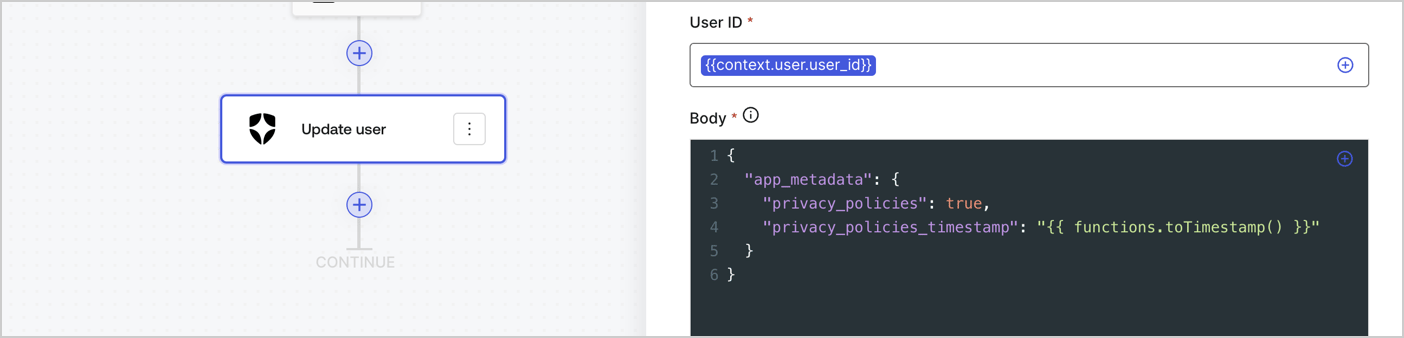
Add an Auth0 Update user action to the flow by following these steps:

1. Select the **Flow** **Update app\_metadata** > **Edit flow** to open the Flow editor in a new tab.
2. Below the StartAction, select the **+** icon to add an **Update user** action. Complete the fields below, then select **Save** to continue.

   * **Connection**: Select from the dropdown the Vault connection to your M2M application.

   * **User ID**: Enter `{{context.user.user_id}}`.

   * **Body**: Copy and paste the following code to update the app\_metadata with the privacy\_policies and privacy\_policies\_timestamp properties.

     ```text lines theme={null}
     {
       "app_metadata": {
         "privacy_policies": true,
         "privacy_policies_timestamp": "{{ functions.toTimestamp() }}"
       }
     }
     ```

   * Select **Save**.
3. Select **Publish** to save.
<Frame>
  <img src="https://mintcdn.com/docs-dev-feat-acl-curated-blocklist/rDeBwN8nBIqRsajn/docs/images/cdy7uua7fh8z/CvMNIwWrOUwaFW4X3G28p/1fb70ae57a20749d9ffaaba8dc0b7e26/update-user-privacy.png?fit=max&auto=format&n=rDeBwN8nBIqRsajn&q=85&s=38897f75e7a4e89c8f09bbba3d6e4faf" alt="Dashboard > Actions > Forms > User case privacy policy code" data-og-width="1404" width="1404" data-og-height="338" height="338" data-path="docs/images/cdy7uua7fh8z/CvMNIwWrOUwaFW4X3G28p/1fb70ae57a20749d9ffaaba8dc0b7e26/update-user-privacy.png" data-optimize="true" data-opv="3" srcset="https://mintcdn.com/docs-dev-feat-acl-curated-blocklist/rDeBwN8nBIqRsajn/docs/images/cdy7uua7fh8z/CvMNIwWrOUwaFW4X3G28p/1fb70ae57a20749d9ffaaba8dc0b7e26/update-user-privacy.png?w=280&fit=max&auto=format&n=rDeBwN8nBIqRsajn&q=85&s=a332db32f215a740f5a4c4f9323b66bd 280w, https://mintcdn.com/docs-dev-feat-acl-curated-blocklist/rDeBwN8nBIqRsajn/docs/images/cdy7uua7fh8z/CvMNIwWrOUwaFW4X3G28p/1fb70ae57a20749d9ffaaba8dc0b7e26/update-user-privacy.png?w=560&fit=max&auto=format&n=rDeBwN8nBIqRsajn&q=85&s=078318676532b46a0fdca56dd7bb381b 560w, https://mintcdn.com/docs-dev-feat-acl-curated-blocklist/rDeBwN8nBIqRsajn/docs/images/cdy7uua7fh8z/CvMNIwWrOUwaFW4X3G28p/1fb70ae57a20749d9ffaaba8dc0b7e26/update-user-privacy.png?w=840&fit=max&auto=format&n=rDeBwN8nBIqRsajn&q=85&s=97d8037dfee885e532814c404e81f500 840w, https://mintcdn.com/docs-dev-feat-acl-curated-blocklist/rDeBwN8nBIqRsajn/docs/images/cdy7uua7fh8z/CvMNIwWrOUwaFW4X3G28p/1fb70ae57a20749d9ffaaba8dc0b7e26/update-user-privacy.png?w=1100&fit=max&auto=format&n=rDeBwN8nBIqRsajn&q=85&s=29126c8631a6a7ce165d6b28af30a97a 1100w, https://mintcdn.com/docs-dev-feat-acl-curated-blocklist/rDeBwN8nBIqRsajn/docs/images/cdy7uua7fh8z/CvMNIwWrOUwaFW4X3G28p/1fb70ae57a20749d9ffaaba8dc0b7e26/update-user-privacy.png?w=1650&fit=max&auto=format&n=rDeBwN8nBIqRsajn&q=85&s=a141e9695688eb8f670d539297aa8154 1650w, https://mintcdn.com/docs-dev-feat-acl-curated-blocklist/rDeBwN8nBIqRsajn/docs/images/cdy7uua7fh8z/CvMNIwWrOUwaFW4X3G28p/1fb70ae57a20749d9ffaaba8dc0b7e26/update-user-privacy.png?w=2500&fit=max&auto=format&n=rDeBwN8nBIqRsajn&q=85&s=d5918cd31ccd186e28d5ccc25da5706c 2500w" />
</Frame>

<Callout icon="file-lines" color="#0EA5E9" iconType="regular">
  The flow **Update app\_metadata** adds a `privacy_policies true` value to the app`_metadata` object and also generates a timestamp with a [helper function.](/docs/customize/forms/variables)
</Callout>

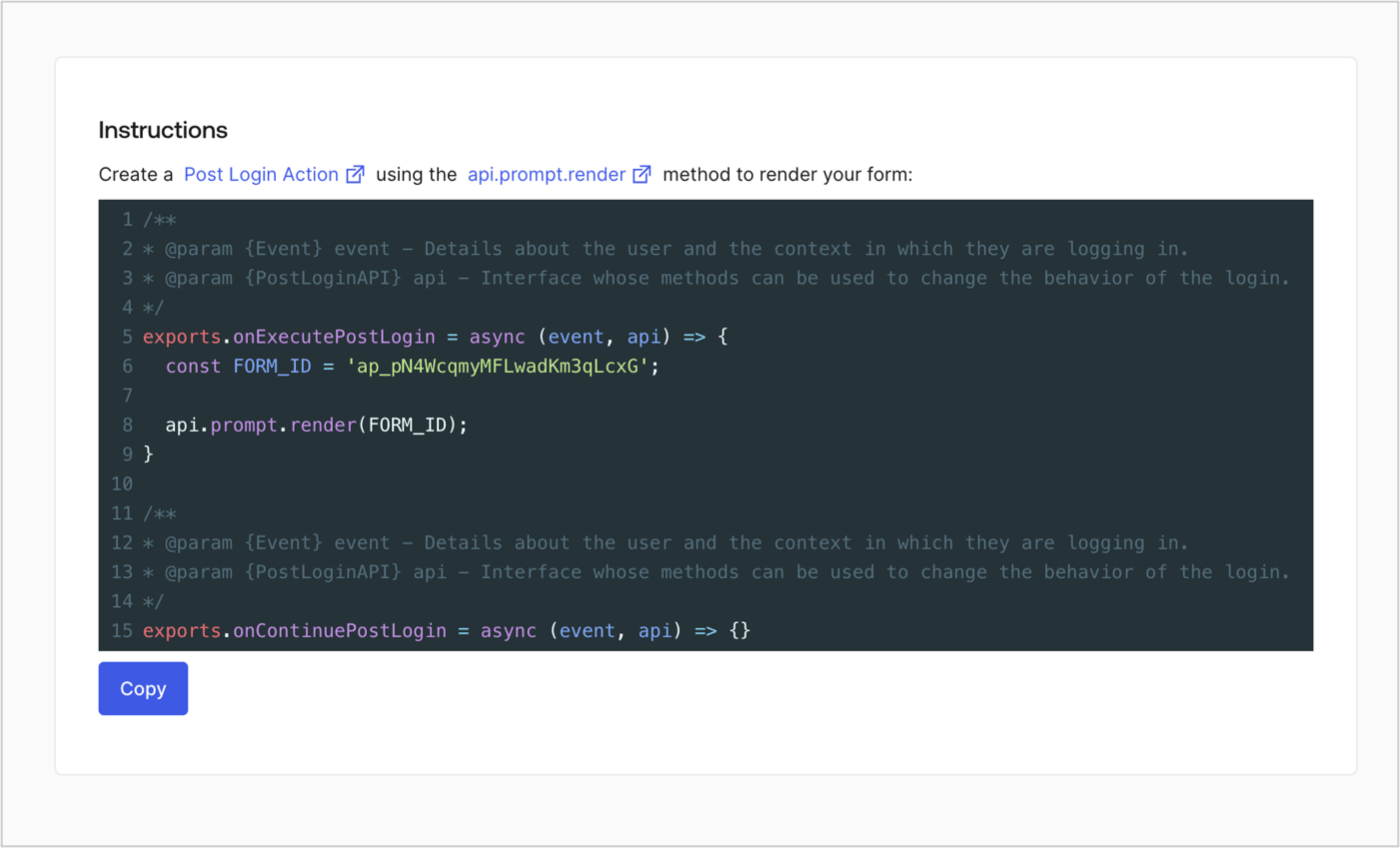
## Retrieve the form render code

Retrieve your form render code to visually render the form with a custom Post Login Action by following these steps:

* From the Form editor, select **`<> Render`**.
* Select **Copy**.
<Frame>
  <img src="https://mintcdn.com/docs-dev-feat-acl-curated-blocklist/cqBfxX3Lyyk7WGUd/docs/images/cdy7uua7fh8z/2EIUzc539sq9lwoTKbjoJv/496a864c0fc44a782c9cadca119dbfb0/embed.png?fit=max&auto=format&n=cqBfxX3Lyyk7WGUd&q=85&s=5f796384b17e407359bef14acef86bd0" alt="Dashboard > Actions > Forms > Form > Embed" data-og-width="1400" width="1400" data-og-height="848" height="848" data-path="docs/images/cdy7uua7fh8z/2EIUzc539sq9lwoTKbjoJv/496a864c0fc44a782c9cadca119dbfb0/embed.png" data-optimize="true" data-opv="3" srcset="https://mintcdn.com/docs-dev-feat-acl-curated-blocklist/cqBfxX3Lyyk7WGUd/docs/images/cdy7uua7fh8z/2EIUzc539sq9lwoTKbjoJv/496a864c0fc44a782c9cadca119dbfb0/embed.png?w=280&fit=max&auto=format&n=cqBfxX3Lyyk7WGUd&q=85&s=dbe27797ea037db3e7c04cb75892a4e2 280w, https://mintcdn.com/docs-dev-feat-acl-curated-blocklist/cqBfxX3Lyyk7WGUd/docs/images/cdy7uua7fh8z/2EIUzc539sq9lwoTKbjoJv/496a864c0fc44a782c9cadca119dbfb0/embed.png?w=560&fit=max&auto=format&n=cqBfxX3Lyyk7WGUd&q=85&s=554121abd5c758e04df3a481b06cf1dd 560w, https://mintcdn.com/docs-dev-feat-acl-curated-blocklist/cqBfxX3Lyyk7WGUd/docs/images/cdy7uua7fh8z/2EIUzc539sq9lwoTKbjoJv/496a864c0fc44a782c9cadca119dbfb0/embed.png?w=840&fit=max&auto=format&n=cqBfxX3Lyyk7WGUd&q=85&s=b83a80fe2335e2f0ec2e67841a9a0ce3 840w, https://mintcdn.com/docs-dev-feat-acl-curated-blocklist/cqBfxX3Lyyk7WGUd/docs/images/cdy7uua7fh8z/2EIUzc539sq9lwoTKbjoJv/496a864c0fc44a782c9cadca119dbfb0/embed.png?w=1100&fit=max&auto=format&n=cqBfxX3Lyyk7WGUd&q=85&s=87150d784b97ed55ac91bd9f0ad60e5e 1100w, https://mintcdn.com/docs-dev-feat-acl-curated-blocklist/cqBfxX3Lyyk7WGUd/docs/images/cdy7uua7fh8z/2EIUzc539sq9lwoTKbjoJv/496a864c0fc44a782c9cadca119dbfb0/embed.png?w=1650&fit=max&auto=format&n=cqBfxX3Lyyk7WGUd&q=85&s=cba70774156fe299d487c65f91b0c3d3 1650w, https://mintcdn.com/docs-dev-feat-acl-curated-blocklist/cqBfxX3Lyyk7WGUd/docs/images/cdy7uua7fh8z/2EIUzc539sq9lwoTKbjoJv/496a864c0fc44a782c9cadca119dbfb0/embed.png?w=2500&fit=max&auto=format&n=cqBfxX3Lyyk7WGUd&q=85&s=275b2674f64248f3b340d40a0ede4342 2500w" />
</Frame>

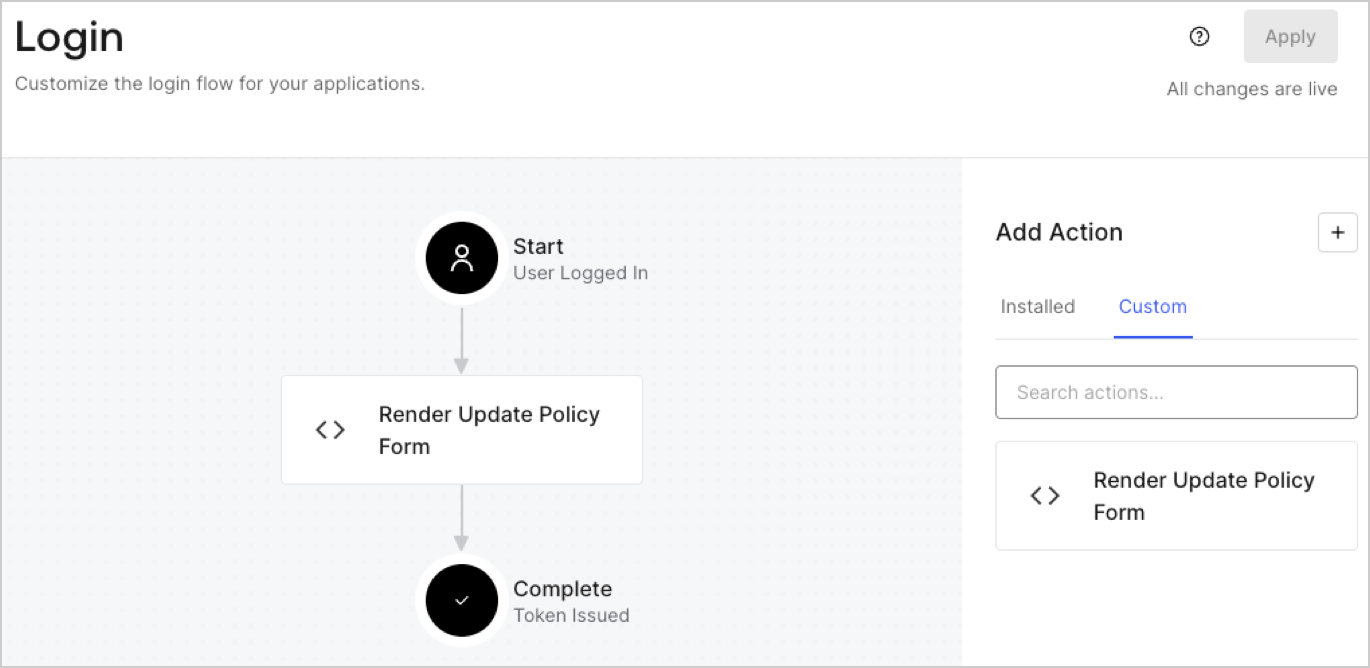
## Create a Post Login Action

Create a post-login Action to render your form by following these steps:

1. Navigate to **Auth0 Dashboard > Actions > Flows > Login.**
2. Select the **+** icon and Select **Build from scratch**:

   * **Name**: Enter `Render Update Policy Form`.
   * **Trigger**: Select `Login / Post Login`.
   * **Runtime**: Select the recommended version.
3. Select **Create**.

To configure the post-login Action:

1. Delete the existing code from the Code editor.
2. Paste the form render code into the Code editor.
3. Edit the code to define the conditional logic that will render the form.

   ```javascript lines theme={null}
   /**
   * @param {Event} event - Details about the user and the context in which they are logging in.
   * @param {PostLoginAPI} api - Interface whose methods can be used to change the behavior of the login.
   */
   exports.onExecutePostLogin = async (event, api) => {
     const FORM_ID = 'REPLACE_WITH_YOUR_FORM_ID';

     if (event.user.app_metadata.privacy_policies !== true) {
       api.prompt.render(FORM_ID);
     }
   }

   exports.onContinuePostLogin = async (event, api) => { }
   ```

   <Callout icon="file-lines" color="#0EA5E9" iconType="regular">
     The example code above will render the form when a user is missing the app metadata `privacy_policies` property.
   </Callout>
4. Select **Deploy.**
5. Drag and Drop the **Render Update Policy Form** Action to the **Login** flow.
   <Frame>
     <img src="https://mintcdn.com/docs-dev-feat-acl-curated-blocklist/2YY8SFFTRvQijQC0/docs/images/cdy7uua7fh8z/5TOwDgevZsBqd7yZynUYWU/41ca909dc3007aed4f40ff794a05efa5/postlogin.png?fit=max&auto=format&n=2YY8SFFTRvQijQC0&q=85&s=b1dbfe94e50163fa1256c66523c0d568" alt="Dashboard > Forms > Use Case > Render update policy form login action" data-og-width="1370" width="1370" data-og-height="668" height="668" data-path="docs/images/cdy7uua7fh8z/5TOwDgevZsBqd7yZynUYWU/41ca909dc3007aed4f40ff794a05efa5/postlogin.png" data-optimize="true" data-opv="3" srcset="https://mintcdn.com/docs-dev-feat-acl-curated-blocklist/2YY8SFFTRvQijQC0/docs/images/cdy7uua7fh8z/5TOwDgevZsBqd7yZynUYWU/41ca909dc3007aed4f40ff794a05efa5/postlogin.png?w=280&fit=max&auto=format&n=2YY8SFFTRvQijQC0&q=85&s=c06681dc032531ee8db54bf99949f8ec 280w, https://mintcdn.com/docs-dev-feat-acl-curated-blocklist/2YY8SFFTRvQijQC0/docs/images/cdy7uua7fh8z/5TOwDgevZsBqd7yZynUYWU/41ca909dc3007aed4f40ff794a05efa5/postlogin.png?w=560&fit=max&auto=format&n=2YY8SFFTRvQijQC0&q=85&s=d10aa8b611397b190a5270bf7907b3d9 560w, https://mintcdn.com/docs-dev-feat-acl-curated-blocklist/2YY8SFFTRvQijQC0/docs/images/cdy7uua7fh8z/5TOwDgevZsBqd7yZynUYWU/41ca909dc3007aed4f40ff794a05efa5/postlogin.png?w=840&fit=max&auto=format&n=2YY8SFFTRvQijQC0&q=85&s=278fdf8f825a73d0619c486edbbfb8da 840w, https://mintcdn.com/docs-dev-feat-acl-curated-blocklist/2YY8SFFTRvQijQC0/docs/images/cdy7uua7fh8z/5TOwDgevZsBqd7yZynUYWU/41ca909dc3007aed4f40ff794a05efa5/postlogin.png?w=1100&fit=max&auto=format&n=2YY8SFFTRvQijQC0&q=85&s=8a387d01c80332c187963253507087c7 1100w, https://mintcdn.com/docs-dev-feat-acl-curated-blocklist/2YY8SFFTRvQijQC0/docs/images/cdy7uua7fh8z/5TOwDgevZsBqd7yZynUYWU/41ca909dc3007aed4f40ff794a05efa5/postlogin.png?w=1650&fit=max&auto=format&n=2YY8SFFTRvQijQC0&q=85&s=513f760d05bd207b5a2d8d6eb3a5cf2e 1650w, https://mintcdn.com/docs-dev-feat-acl-curated-blocklist/2YY8SFFTRvQijQC0/docs/images/cdy7uua7fh8z/5TOwDgevZsBqd7yZynUYWU/41ca909dc3007aed4f40ff794a05efa5/postlogin.png?w=2500&fit=max&auto=format&n=2YY8SFFTRvQijQC0&q=85&s=710fb5c2544613abdbbd40aa1fea8304 2500w" />
   </Frame>
6. Select **Apply.**

### Test implementation

Test the implementation by following these steps:

1. Log in with an existing user whose app`_metadata` attribute `privacy_policies` does not have a value.
2. The post-login Action in the Login flow will render the form and prompt for acceptance.
3. Select **Auth0 Dashboard > User Management > Users,** locate the user and verify that the `app_metadata` attribute `privacy_policies` contains a `true` value and a timestamp.
